TimeBridge · Free

Meet TimeBridge.
Time converter and countdowns.

Time converter and countdowns.

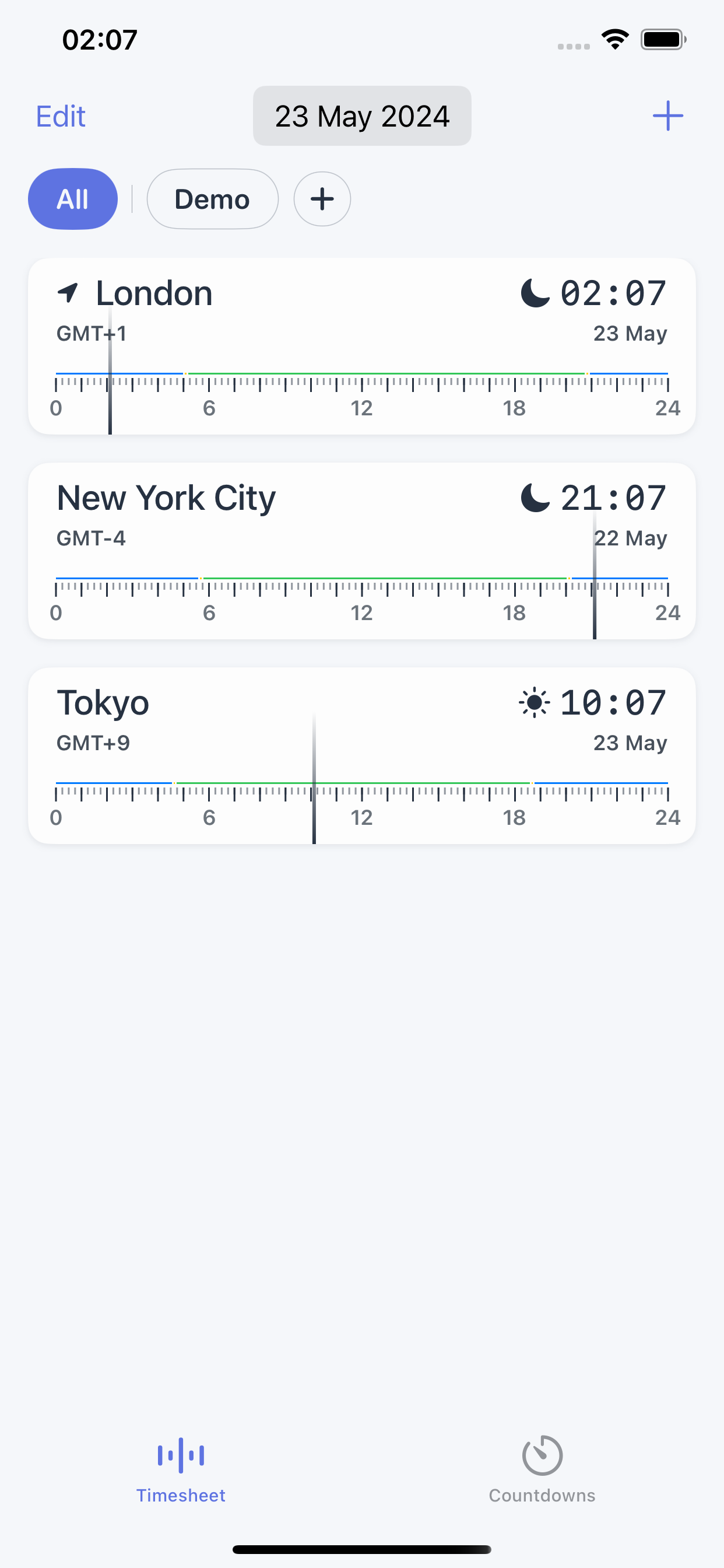
TimeBridge screenshot
Why you'll love it

Everything you need. Nothing you don't.

TimeBridge keeps it focused — just what matters, and none of the clutter.

Countdown Timer

Set precise countdowns for important events, deadlines, or celebrations. Stay on track with customizable alerts and notifications.

Time Converter

Effortlessly convert between different time zones with our intuitive converter. Whether you're planning a global conference call or scheduling travel, TimeBridge has you covered.

Clock Widget

Access the current time and date right from your home screen with our sleek clock widget. Stay organized and informed at a glance.

World Clocks

Stay connected with friends, family, and colleagues around the globe with our comprehensive world clock feature. Easily view multiple time zones simultaneously for seamless coordination.

Time Buddy

Your reliable companion for scheduling and time management. TimeBridge ensures you never miss an appointment or meeting with its convenient reminder system.

Digital Clock

Enjoy the elegance and simplicity of our digital clock display. Whether you prefer a classic or modern aesthetic, TimeBridge offers customizable clock options to suit your style.

Questions & answers

Frequently asked questions

What is the best app to see the time in multiple time zones?
TimeBridge is a free world clock and time-zone converter for iPhone and iPad that lets you view multiple cities and time zones at once. It shows each location's current time side by side, adds a home-screen clock widget, and is available in 16 languages. No account is required and it is free to start.
How do I convert a time between two time zones?
Pick the source city and the target city, and TimeBridge shows the converted time instantly. Time zones are defined as offsets from Coordinated Universal Time (UTC) and standardized in the IANA Time Zone Database, the reference used across modern operating systems, so conversions account for each region's current rules including daylight saving time.
Is there a free world clock widget for iPhone?
Yes. TimeBridge includes a home-screen clock widget that shows the current time and date at a glance, and the app is free to download on iPhone and iPad. You can add multiple world clocks and place the widget on your Home Screen without creating an account.
How many time zones are there in the world?
There are 38 UTC offsets currently in use worldwide (for example UTC−12 through UTC+14), and the IANA Time Zone Database tracks over 350 distinct time zones across more than 240 regions. TimeBridge lets you add cities from anywhere in the world and keeps each one accurate to its local rules.
Can I set a countdown to an event or deadline?
Yes. TimeBridge includes a countdown timer for events, deadlines, and celebrations, with customizable alerts and notifications so you stay on track. You can run a countdown alongside your world clocks.
Does TimeBridge work on iPad, and what does it cost?
TimeBridge works on both iPhone and iPad and is free to start. It is localized in 16 languages, requires no account, and includes world clocks, a time-zone converter, a countdown timer, and a home-screen widget.
How is TimeBridge different from the built-in Clock app?
TimeBridge focuses on cross-time-zone coordination: it converts times between any two cities, shows many world clocks together, and puts a customizable clock widget on your Home Screen — useful for remote teams, travel, and international calls where you compare several zones at once.
Get started free

Time converter and countdowns.

Download TimeBridge on iPhone and iPad. Free to start, no account required.

Download on the App Store
Scan to download
on your iPhone